Preparation

    How a GraphQL Resolver Fetches Data Under the Hood

    12 min read
    Jul 12, 2026
    How a GraphQL Resolver Fetches Data Under the Hood

    The GraphQL Resolver Tree: How Parent Fields Drive Child Resolvers

    In GraphQL, every field is resolved by a resolver function. These resolver functions form a tree-like structure, where parent fields are resolved before child fields. This tree structure is crucial for understanding how GraphQL queries are executed.

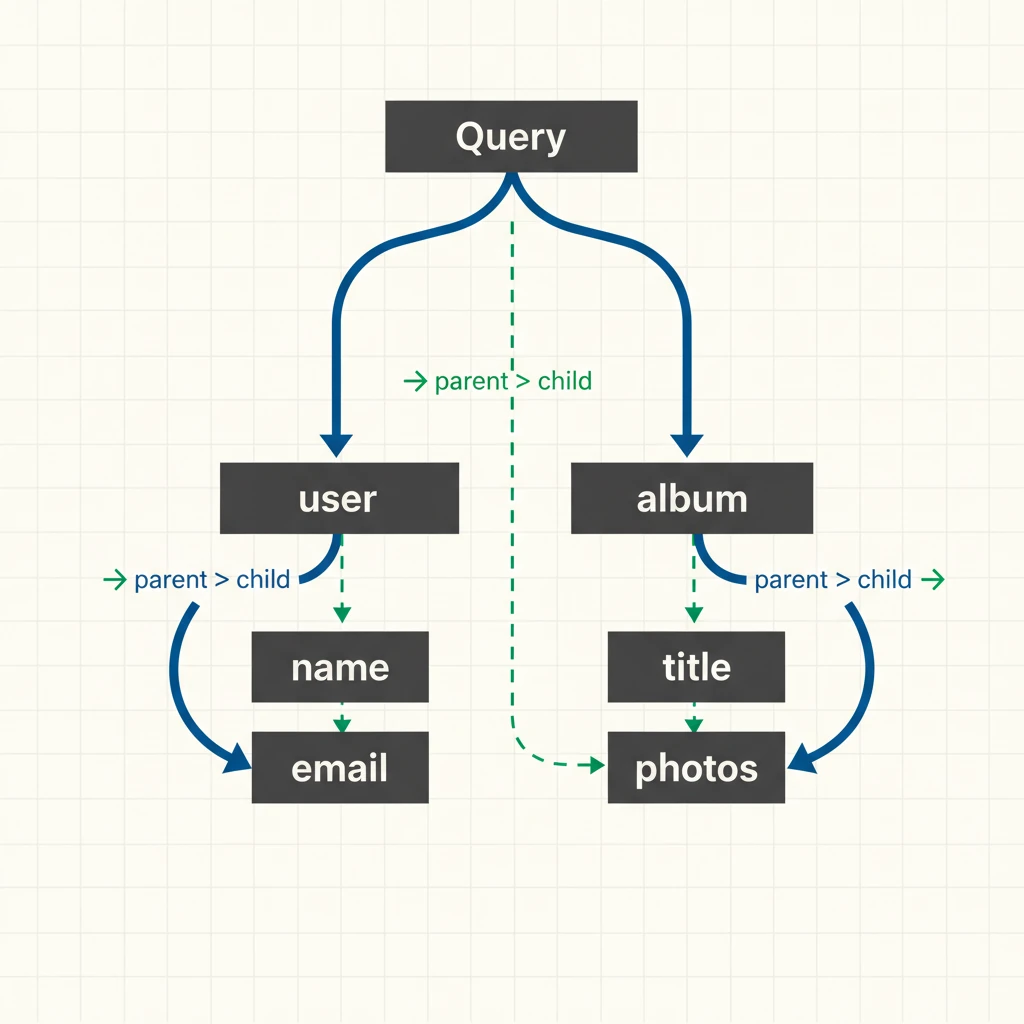
    The GraphQL query execution process starts at the root Query type, which serves as the entry point to the resolver tree. When a query is executed, the resolver for the root field is called, and it resolves the value for that field. Once the parent field is resolved, its children are executed. This process continues until all fields in the query are resolved.

    Resolvers are functions responsible for returning the value for a specific field in a GraphQL query. If no resolver is provided for a field, GraphQL.js attempts to retrieve a property from the parent object that matches the field name. If the property is a function, it calls the function and uses the result; otherwise, it returns the property value directly [graphql-js].

    Resolver Tree Structure

    The resolver tree structure can be understood by considering a simple GraphQL query:

    graphql Query { User(id: "123") { Name Address { Street City } } }

    In this query, the resolver for the user field is called first, which returns the user object. Then, the resolvers for the name, address, street, and city fields are called, with the parent object being the user object.

    Resolver Execution Order

    GraphQL resolves fields according to the structure of the selection set. A parent field must produce its result before GraphQL can resolve the child fields that depend on that result. Sibling fields may be resolved independently and, depending on the implementation, may execute concurrently.

    For example, after the user resolver returns a user object, GraphQL can resolve fields such as name and address. The street and city fields under address can then be resolved once the address value is available.

    Default Resolver Behavior

    If no resolver is provided for a field, GraphQL.js uses a default resolver that attempts to retrieve a property from the parent object that matches the field name. This default behavior can be useful for simple cases, but it is often overridden with custom resolvers to handle complex logic.

    In summary, the GraphQL resolver tree is a tree-like structure where parent fields are resolved before child fields. Resolvers are functions responsible for returning the value for a specific field in a GraphQL query. Understanding the resolver tree structure and execution order is crucial for building efficient and scalable GraphQL APIs.

    Clean 2D diagram of a vertical resolver tree with a top-level 'Query' node branching into 'user' and 'album' parent fields, each splitting into child resolver nodes ('name', 'email', 'title', 'photos'), with directional arrows annotated 'parent → child' and a light Swiss-style grid background - illustration
    Clean 2D diagram of a vertical resolver tree with a top-level 'Query' node branching into 'user' and 'album' parent fields, each splitting into child resolver nodes ('name', 'email', 'title', 'photos'), with directional arrows annotated 'parent → child' and a light Swiss-style grid background - illustration

    Breadth-First Execution: Why Root Fields Run in Parallel and the Ordering Trap

    In GraphQL, root query fields, such as 'user' and 'album', are executed in parallel, but without any specific order. This parallel execution is based on the assumption that resolvers are atomic, idempotent, and side-effect free. The execution tree follows a breadth-first approach, meaning that a parent field must be resolved before its children are executed. For instance, in a query like query { user { name email } }, the 'user' field must be resolved before its children 'name' and 'email' are executed Medium.

    The parallel execution of root fields can mask performance issues that might only surface at scale. For example, if a resolver for a root field has a high latency, it may not be immediately apparent in a small-scale application. However, as the application grows, the latency can become a significant bottleneck. In Indian server environments with limited concurrency, this can be particularly problematic.

    Implications for Server Environments

    When deploying GraphQL APIs in server environments with limited concurrency, such as those found in India, it's essential to consider the implications of parallel execution. If not properly optimized, the parallel execution of root fields can lead to increased latency and decreased performance.

    Execution BehaviorParallelSerial
    Execution OrderNo particular orderSequential order
    Resolver AssumptionsAtomic, idempotent, side-effect freeFlexible, but may have side effects
    Performance ImplicationsMay mask performance issues at small scalePerformance issues more apparent at small scale
    Server Environment ConsiderationsRequires optimization for limited concurrencyEasier to optimize for limited concurrency

    By understanding the implications of parallel execution and taking steps to optimize resolver performance, developers can build high-performance GraphQL APIs that scale efficiently in a variety of server environments.

    The N+1 Query Problem: A Real Bottleneck in GraphQL APIs

    The N+1 query problem is a common issue in GraphQL APIs, particularly when nested resolvers independently fetch related data. It occurs when resolving a list of nested fields triggers one query for the list and N queries for each item, leading to a substantial increase in database round trips.

    For instance, consider a scenario where an application fetches a list of posts along with their authors. Without proper optimization, this might result in one query to retrieve the posts, followed by a separate query for each post to fetch its author. If there are dozens or hundreds of posts, this can translate to a large number of database queries, causing performance degradation and latency issues.

    Industry practices suggest that the N+1 query problem can have a significant impact on API performance. This is a critical issue that needs to be addressed to ensure optimal application performance.

    To better understand the N+1 query problem, let's consider a typical example. Suppose we have a list of posts, and each post has an author. If we want to fetch the posts along with their authors, a naive implementation might execute one query to retrieve the posts, and then one query per post to fetch the author. This results in a total of N+1 queries, where N is the number of posts.

    The N+1 query problem is a well-known issue in software development, and there are various strategies to mitigate it. Some approaches include using batching, caching, or optimizing database queries to reduce the number of round trips.

    By understanding the N+1 query problem and its implications, developers can take proactive steps to optimize their application's performance and ensure a better user experience. In the following sections, we will delve deeper into the technical aspects of the N+1 query problem and explore strategies for addressing it.

    A stressed developer in a busy Indian office cubicle staring at a MySQL database icon surrounded by 101 glowing red query arrows pointing at it, while a GraphQL schema sheet lies on the desk showing a nested 'orders/user' field, with legacy server racks in the background - illustration
    A stressed developer in a busy Indian office cubicle staring at a MySQL database icon surrounded by 101 glowing red query arrows pointing at it, while a GraphQL schema sheet lies on the desk showing a nested 'orders/user' field, with legacy server racks in the background - illustration

    DataLoader Under the Hood: Batching and Caching in a Single Event Loop Tick

    DataLoader, a utility library originally developed by Facebook, addresses the N+1 problem in GraphQL APIs by implementing batching and caching mechanisms. This transforms the inefficient process of making multiple individual requests into a more efficient batch process.

    How DataLoader Works

    When a GraphQL query is executed, DataLoader collects all .load(key) calls made during a single tick of the event loop. These calls are then batched into a single batchLoadFn(keys) call, which fetches the required data in bulk. This approach can reduce many individual database requests into a smaller number of batched requests. For example, fetching a list of posts and their authors may require one query for the posts and one batched query for all required authors instead of one author query per post. The exact number of database queries depends on the fields being resolved and the DataLoaders used.

    Implementing DataLoader from Scratch

    To implement DataLoader from scratch in a GraphQL.js context,

    javascript
    class SimpleDataLoader {
      constructor(batchLoadFn) {
        this.batchLoadFn = batchLoadFn;
        this.cache = new Map();
        this.queue = [];
        this.scheduled = false;
      }
    
      load(key) {
        if (this.cache.has(key)) {
          return this.cache.get(key);
        }
    
        const promise = new Promise((resolve, reject) => {
          this.queue.push({ key, resolve, reject });
        });
    
        this.cache.set(key, promise);
    
        if (!this.scheduled) {
          this.scheduled = true;
          queueMicrotask(() => this.dispatch());
        }
    
        return promise;
      }
    
      async dispatch() {
        const batch = this.queue;
        this.queue = [];
        this.scheduled = false;
    
        const keys = batch.map(item => item.key);
    
        try {
          const values = await this.batchLoadFn(keys);
    
          batch.forEach((item, index) => {
            item.resolve(values[index]);
          });
        } catch (error) {
          batch.forEach(item => item.reject(error));
        }
      }
    }
    
    const loader = new SimpleDataLoader(async keys => {
      console.log("Fetching users:", keys);
      return keys.map(key => `User ${key}`);
    });
    
    loader.load("1").then(console.log);
    loader.load("2").then(console.log);
    Note:This simplified implementation demonstrates the core ideas behind DataLoader: collecting multiple load requests, batching their keys into one batch function call, and memoizing results within the loader instance. Production DataLoader implementations provide additional behavior and edge-case handling.

    Example: How Batching Can Reduce 16 Requests to 4

    Batching with DataLoader has been shown to significantly reduce the number of requests made to a database, resulting in improved performance and reduced infrastructure costs. In a real-world scenario, a query for top products, stock, reviews, and authors was reduced from 16 individual requests to just 4 batched requests.

    This reduction in requests is achieved by grouping multiple queries into a single batch, allowing the database to process them more efficiently. For example, instead of making 16 separate requests for top products, stock, reviews, and authors, DataLoader can batch these queries into four requests: one for top products, one for stock, one for reviews, and one for authors.

    In this example, batching reduces the number of backend requests substantially. According to WunderGraph, this optimization can reduce the number of requests made to the database by up to 75%. This reduction in requests translates directly to cost savings, as fewer requests result in lower infrastructure costs.

    For Indian engineers optimizing for lower infrastructure budgets, implementing batching with DataLoader can have a significant impact. By reducing the number of requests made to the database, developers can improve performance while also reducing costs. This is particularly important in India, where infrastructure costs can be a significant factor in the overall cost of deploying an application.

    By adopting batching with DataLoader, developers can improve the performance and scalability of their applications while reducing infrastructure costs. This optimization technique is particularly relevant for Indian engineers looking to optimize their applications for lower infrastructure budgets.

    Production-Grade Federated Caching: Apollo Gateway + DataLoader + Redis

    In a federated GraphQL architecture, caching is crucial to reduce the load on subgraphs and improve performance. A real-world federated caching stack typically combines an Apollo Gateway with DataLoader and Redis. The flow involves: Apollo Gateway -> Response Cache (TTL) -> Cross-Service Loaders -> Redis Cache -> Subgraph (Users, etc.) with DataLoader blog.foujeupavel.com.

    Caching Strategy Decision Points

    When building a federated GraphQL system, it's essential to decide when to use DataLoader alone versus adding Redis for federated graphs. DataLoader provides per-request batching, which reduces the number of requests made to subgraphs. However, it doesn't store cached responses across requests.

    Adding Redis for Cross-Request Caching

    Redis adds cross-request caching, which stores cached responses across multiple requests. This is particularly useful for data that doesn't change frequently. Indian unicorns like Flipkart and Razorpay use this pattern in their GraphQL layers to improve performance.

    Quiz: Caching Strategy Decision Points

    Knowledge Check

    When would you use DataLoader alone versus adding Redis for federated graphs?

    Frequently Asked Questions

    What is the N+1 query problem in GraphQL, and how does DataLoader solve it?

    The N+1 query problem occurs when resolving a list of nested fields triggers one initial query followed by N additional queries for each item in the list—for example, fetching a list of posts and then querying each post’s author individually. DataLoader, originally developed by Facebook, solves this by batching all .load(key) calls made during a single event loop tick into a single database query, and caching results for the life of the request. The N+1 query problem occurs when resolving a list of nested fields triggers one initial query followed by additional queries for individual items—for example, fetching a list of posts and then querying each post's author separately. DataLoader can batch those individual .load(key) calls into a smaller number of backend requests and cache repeated loads within the same request. For example, a posts query plus a batched authors query can reduce many author queries to a single batch request.

    How does GraphQL execute resolvers—are root fields run in parallel or sequentially?

    GraphQL executes resolvers in a breadth-first manner: parent fields are always resolved before their child fields, because the parent’s return value is passed to the child resolver. Root query fields (e.g. user and album) are executed in parallel and in no particular order, under the assumption that they are atomic, idempotent, and side-effect free. This parallel execution at the root level, combined with the strict parent-before-child ordering deeper in the tree, ensures efficient and predictable data fetching.

    How does DataLoader batch and cache requests within a single event loop tick?

    DataLoader works by collecting all .load(key) calls that occur during the same tick of the event loop, then invoking a single batchLoadFn(keys) function with the full array of keys. The results are cached per request, so if the same key is loaded again within the same request, it returns the cached value without another batch call. To use it in a graphql-js server, you create a new DataLoader instance per request, attach it to the context, and call .load(id) in your resolvers—this ensures batching and caching are scoped to each GraphQL operation.

    What does a production-grade federated caching stack for GraphQL look like?

    In a federated GraphQL architecture, a real-world caching stack typically combines an Apollo Gateway with DataLoader and Redis. The flow is: Apollo Gateway → Response Cache (with TTL) → Cross-Service Loaders → Redis Cache → Subgraph (e.g. Users) with DataLoader. This pattern solves N+1 query problems across subgraphs, reduces network chatter, and improves performance by caching frequently accessed data at multiple layers. Batching with DataLoader alone can slash 16 database queries down to 4 in production, as seen in real-world examples.

    4th Floor, Bizness Square, Opp. Hitex Charminar, Hitec City, Hyderabad - 500081
    (684) 555-0102
    Subscribe to get latest updates
    Follow us on:
    ©2026 Cantilever Labs Pvt. Ltd. | info@cantileverlabs.com